
On this page +
Start with a blueprint you own
The item fabricator lists blueprints, including ones you have not collected. Choose an available blueprint and read its material requirements. A recipe appearing in a database does not mean your character can craft it now.
Use SC Craft Tools to explore recipes and quality effects. SCMDB covers missions, crafting and mining data. Check the game-data version and confirm the recipe in the fabricator before shopping.
Prepare a build sheet
Write down the output, quantity and the stats you care about. Then make a material list with four columns: material, amount, quality and location. This is the MSI habit worth borrowing: stock somewhere else is not stock ready for tonight’s build.
| Record | Question to answer |
|---|---|
| Blueprint & output | Do I own it, and how many finished items do I need? |
| Each ingredient | What type and quantity does the in-game recipe request? |
| Quality & result | What output stats does this selection actually preview? |
| Location & reserve | Is the stock here, and is any of it already promised for another build? |
Read the preview before committing
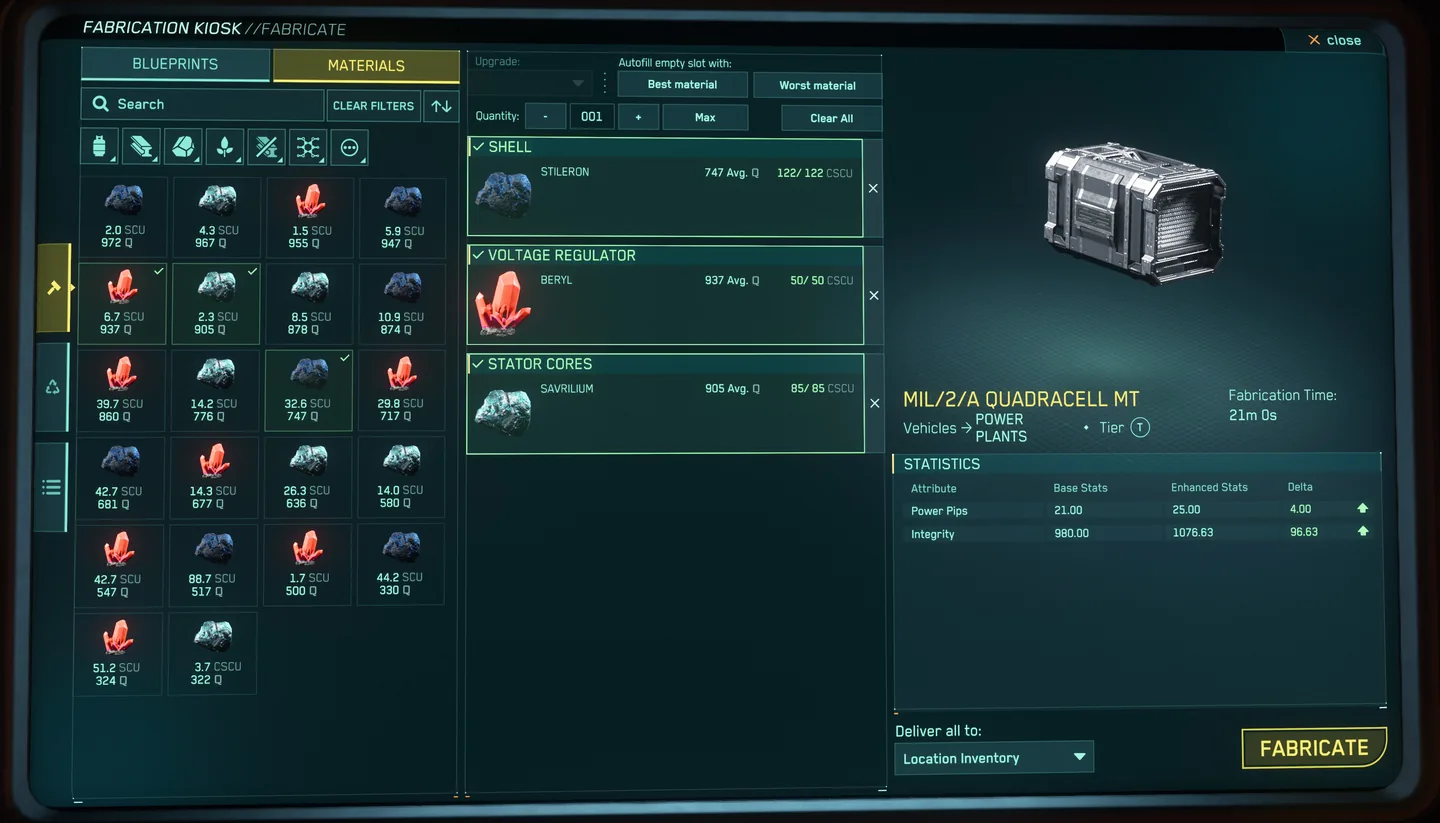
Assign materials manually when quality matters. The selected stacks can change the displayed output stats; mixed qualities may average. Inspect autofill’s choices before starting a valuable job.
Our recommendation is to choose an output target first, then compare material selections against that target. A higher quality number is only useful if the resulting improvement is worth the material you are giving up. Keep especially scarce stock out of a first experiment.
Make one, inspect it, then repeat
- Select a blueprint you can use and confirm the required ingredients.
- Assign the intended material stacks and check the output preview.
- Start one job and check its status in the fabricator queue.
- Inspect the finished item and record what you consumed.
- Only then repeat the recipe with the materials you have reserved.
Crafting time varies, and completed jobs can be checked through the queue’s history. Dismantling can recover resources, but the recovered quantity can be lower: it is not a lossless undo button.
Value the stock you used
“I mined it myself” does not make a material free. For planning, MSI uses the cost of replacing what a build consumes. That helps compare keeping the ore, selling it or putting it into a component.
For your first build, record actual material use and the result. Avoid turning a rough recipe estimate into a sale promise. If crafting for someone else, agree the output and delivery arrangements before using their materials or taking on a job.
Quick checks when a job stalls
- Blueprint unavailable: confirm you have unlocked or collected it; a website listing alone is not enough.
- Ingredients missing: compare the requested material and amount with the stock available at the crafting location.
- Unexpected stats: inspect assigned quality values and any mixed stacks or autofill choices.
- Unexpected result: stop the batch, compare your notes and check the current patch before using more stock.
Need a hand? Bring the component name, recipe and your material list to TAW Discord and ask for MaverickSabre. Start with mining basics if you want to gather your own inputs.